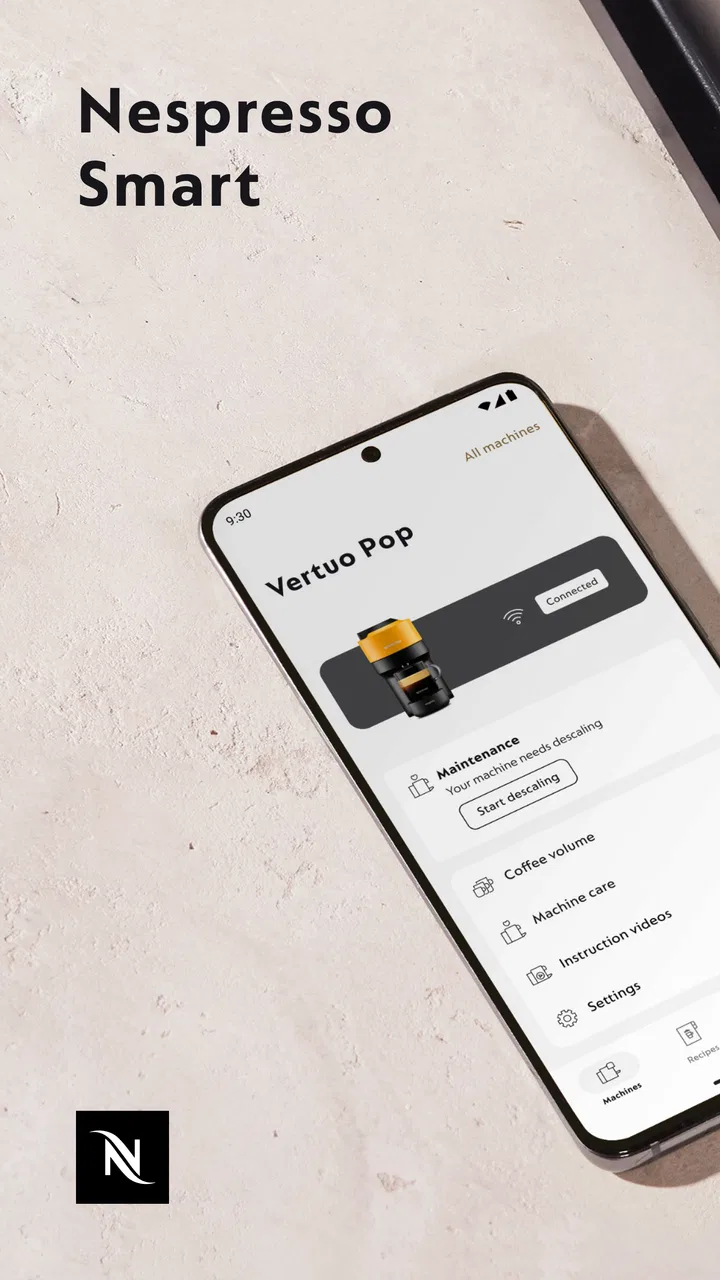
Nespresso Smart
- 3.2
- Rating
- 100.00K
- Installs
- Free
- Price

 Analysis by App-foxy
I approached Nespresso Smart as a practical companion for a connected Vertuo coffee machine, not as another app I would open for entertainment. Its purpose is narrow but useful: it brings machine management into the phone, so the value depends less on how many screens it has and more on whether those screens make a morning coffee routine easier. After spending time with it, my impression is that it works best when you already own a compatible connected Vertuo machine and want a more convenient way to interact with it.
This is a free Food & Drink app from Nespresso, available to Everyone and released on September 23, 2024. It has passed the early adoption stage with over one hundred thousand installs, while its average sits at 3.2 from more than nine hundred ratings. That combination tells me to keep expectations realistic: there is clear interest, but the experience has not been universally smooth for users.
The current version is 1.3.0 and requires Android 8.0 or later. Those details make it accessible to many older phones, although compatibility with the operating system is only one part of the question. The more important issue is whether your particular Vertuo machine can connect and remain useful through the app. If you use a standard coffee maker without connected functionality, this is unlikely to add anything meaningful to your routine.
You May Also Like

 Blood Strike: 2.5 Anniversary
Blood Strike’s Loadouts Turn Every Drop Into a Tactical Gamble
A close look at Blood Strike’s custom loadouts: how fast access to signature weapons reshapes its battle royale rhythm, rewards preparation, and narrows the gap between fights.

 Pandora - Music & Podcasts
Pandora’s Music Is Easy to Start, but Harder to Recover
Pandora’s strength is its low-effort path from a seed to a station. Its weak spot is how much confidence it asks you to place in connection, setup, and quiet recovery.

 8 Ball Pool
 Is Built on Rivalries, Rematches, and Routine
A close look at the rivalries, rematches, shared routines, and unanswered safety questions that turn a quick pool match into a persistent mobile community.

 Samsung Music
’s Quiet Strength Is Playing What You Already Own
Its reach comes less from spectacle than from dependable access to a personal library. That simplicity is both the app’s strongest retention engine and its ceiling.

 AccuWeather: Weather Radar
AccuWeather Review: A Quick, Clear Forecast for Everyday Decisions
For everyday plans, the best forecast is the one you can understand quickly. AccuWeather makes rain timing, radar, and local conditions easy to act on, with a few trade-offs.

 Hill Climb Racing
Why Hill Climb Racing Still Turns Crashes Into One More Run
A tiny car, a bumpy hill and one more upgrade: Hill Climb Racing keeps resurfacing because its simple chaos makes every near-miss feel personal.
More From Our News Desk
View All News


How Nespresso Smart feels during everyday use
I find the most useful way to judge a connected coffee app is to separate what the phone visibly lets me do from what I might assume happens behind the scenes. In this section, I’ll focus on the choices a user can make while handling setup and routine use, then consider which moments deserve a little extra care. That distinction helps keep expectations practical without turning ordinary convenience into a promise about privacy or reliability.
Speed expectations before the first cup
My first expectation with an app like this is immediate responsiveness. Coffee is a small daily ritual, and nobody wants to spend several minutes navigating a phone before pressing a button on the machine. Nespresso Smart is most convincing when it feels like a control layer rather than a separate task. The improved user experience is aimed at making connected Vertuo management less awkward, but the benefit is still tied to the quality of the connection between phone, app, and machine.
That distinction matters. A phone screen can open quickly while the machine connection takes longer to become available. If you are standing in the kitchen with a mug ready, a short wait can feel more irritating than it would in a less time-sensitive app. I would therefore treat the app as a convenience for checking and managing the machine, not as a guaranteed shortcut for every coffee preparation.
The practical way I would use it is to open the app before I need it, especially if I am about to clean, adjust, or check something on the Vertuo. That small change avoids turning the first coffee of the day into a troubleshooting session. It also lets the phone and machine establish their relationship while I am doing something else, rather than making the entire routine depend on an instant connection.
For a new owner, the setup experience deserves patience. Connected appliances are more demanding than ordinary apps because the phone is only one part of the system. A successful experience depends on the machine being available, the phone meeting the Android requirement, and the connection remaining recognizable when you return later. I would not judge the app solely by how quickly its opening screen appears.
What happens during heavier use
Light use is straightforward in concept: open the app, look at the connected Vertuo machine, and carry out the management task you need. Heavier use is different. It may involve checking several machine-related screens, moving between the app and the physical appliance, or repeating an action after the connection has taken a moment to respond. This is where a companion app earns its place, because convenience should increase as the workflow becomes more involved.
One of the more useful habits is to treat the app as a preparation and maintenance tool rather than something that must be open for every cup. If I only want coffee, the physical machine is naturally simpler. If I need to manage the connected appliance, the app becomes more valuable because it keeps the relevant information and controls in one place. That division prevents the phone from becoming an unnecessary step in a routine that was already quick.
Another realistic scenario is a shared kitchen. One person may use the machine frequently while another only needs occasional access to its connected management features. In that situation, the app can be helpful when someone wants to check the machine without standing directly beside it, but it may be less convenient if every household member has to repeat setup or resolve connection confusion. I would recommend agreeing on one primary phone for regular management before asking everyone to use it independently.
For people who prepare several drinks in a row, the app’s usefulness depends on whether it stays in sync with the machine without demanding repeated attention. I would avoid assuming that a connected screen automatically makes a busy coffee station faster. The real advantage is reducing uncertainty around machine management; the physical brewing process still belongs to the Vertuo itself.
Stability and recovering from interruptions
Reliability is the area where I would be most cautious. A connected appliance app has more opportunities for friction than a normal recipe or shopping app. The phone can lose sight of the machine, the app can return from the background in an imperfect state, or the appliance can simply not be ready when the phone requests information. I would not call every interruption a serious failure, but it changes how much trust I place in the app during a rushed morning.
My preferred recovery approach is simple: first check the physical machine, then return to the app instead of repeatedly tapping the same control. Repeated attempts can make it harder to tell whether the issue is the app, the connection, or the appliance. Closing and reopening the app is a sensible second step, while moving closer to the machine can also remove one obvious variable. These are ordinary recovery habits, but they matter more here because the app and hardware are dependent on each other.
I also recommend keeping the app updated when a new version is available. The current release, 1.3.0, suggests that the product is still being refined rather than being a completely mature, unchanging utility. That is not automatically negative: early improvements can make the experience better. It does mean I would leave room for occasional changes in behavior after updates and would avoid building an elaborate household routine around one exact screen layout.
The rating of 3.2 is useful context for my expectations. It is not a reason to dismiss the app, but it does suggest that the experience may vary between users, phones, machines, or connection conditions. I would be comfortable trying it with a compatible Vertuo, yet I would not promise a flawless experience to someone who is already frustrated by smart-home setup in general.
Phone age, operating system, and practical limits
The minimum requirement of Android 8.0 or later is generous enough for many existing Android phones. Still, an operating-system requirement does not guarantee the same experience on every device. An older phone may technically install the app but offer less comfortable multitasking, slower transitions, or more aggressive background management. If the app seems to forget its connection after being left unused, the phone’s battery or background behavior may be part of the explanation rather than a fault in the coffee machine.
I would also consider the phone’s role in the household. If it is an old spare device that is rarely unlocked, Nespresso Smart may be less convenient than on the phone you already carry into the kitchen. A connected appliance companion works best when the device used for it is available, charged, and familiar. Installing it on a tablet stored in another room defeats much of the convenience.
Storage and resource demands are not the main concern for this kind of utility. The app has a focused purpose, so I would expect it to be lighter in day-to-day use than a video, social, or shopping application. However, I would not keep it running constantly just to manage a coffee machine. Opening it when needed is the more sensible balance, especially on an older phone where unnecessary background activity can affect the overall experience.
There is also a compatibility decision before installation: this is specifically for managing a connected Vertuo coffee machine. If your machine is not part of that connected setup, the app is not a universal Nespresso catalog, recipe library, or replacement for the controls on a conventional coffee maker. That is the clearest situation in which I would skip it.
Where it beats ordinary alternatives
The usual alternative is to use the buttons and indicators on the coffee machine itself. That remains the fastest option for simple brewing, and it has an important advantage: it does not depend on a phone. If all you want is to make a familiar drink and move on, the physical controls are harder to beat. Nespresso Smart becomes more attractive when you want the connected Vertuo’s management experience available in a larger, more readable interface.
Compared with a general Food & Drink app, this one is much less broad but more relevant to a specific appliance. A recipe app can help you decide what to make; a shopping app can help you buy ingredients; Nespresso Smart is concerned with the machine itself. I would not install it expecting inspiration or a large coffee reference library. Its strength is focus, and its weakness is that the focus leaves little reason to keep using it if you do not need connected machine management.
There is a useful trade-off here. The app can make a smart Vertuo feel more approachable because the phone presents machine-related actions in a familiar format. At the same time, every extra layer introduces another possible point of failure. A fully offline coffee routine is less capable but more predictable. A connected routine can be more informative and manageable, yet it asks you to maintain the relationship between hardware and software.
Three habits that make the experience better
My first tip is to complete setup when you are not in a hurry. Do it at a calm time, with the machine available and the phone updated, rather than during the first rushed coffee of the day. This gives you time to notice whether the connection is stable and to learn where the management controls are located.
My second tip is to use the app for tasks that benefit from a screen, not for actions that the machine already handles instantly. That keeps the phone from becoming a needless middleman. I found this especially important for maintaining a fast morning routine: use the app when it adds clarity, and use the physical controls when they are already the simpler route.
My third tip is to establish a recovery order before a problem occurs. Check the machine’s physical state, reopen the app, and only then consider repeating the connection process. This avoids wasting time on blind taps and makes it easier to identify whether the problem is temporary or persistent. It is a small workflow, but it is more useful than assuming a connected appliance will always reconnect automatically.
A fourth practical insight is to choose the primary phone deliberately. In a shared home, one reliable device is often better than several partially configured ones. Other household members can still use the machine physically, while the main phone handles connected management. That arrangement reduces duplicated setup and makes troubleshooting less confusing.
Who should install it
I would recommend Nespresso Smart to someone who owns a compatible connected Vertuo machine and wants a phone-based way to manage it. It makes the most sense for users who appreciate appliance information in an app, prefer a larger interface to small physical indicators, or want to keep machine management separate from the act of brewing.
It is also a reasonable choice for people who are comfortable with smart-home products and do not mind occasional connection checks. The free price removes the financial barrier to trying it, and the Everyone age rating makes it suitable for a broad household audience. The app’s value is therefore mainly about compatibility and routine, not cost.
I would skip it if you use a non-connected coffee machine, if you want a general coffee recipe app, or if you strongly prefer appliances that never involve a phone. I would also hesitate to recommend it to someone who expects every coffee to be faster simply because the machine has an app. The connected layer can improve management, but it does not replace the simplicity of pressing the machine’s own controls.
My performance verdict
After weighing speed, stability, device limits, and recovery, I see Nespresso Smart as a focused companion rather than an essential app for every Nespresso owner. Its best quality is that it gives a connected Vertuo a more approachable management experience. Its main weakness is the dependence on a reliable relationship between the phone and the appliance, which can make a simple coffee routine feel more complicated when the connection misbehaves.
The 1.3.0 release, the Android 8.0 minimum, and the growing install base make it easy for many Android users to try without paying. Still, the 3.2 average rating keeps my recommendation measured. I would install it when I had the right machine and a genuine need for connected management, then judge it by how consistently it helps with my own routine.
My bottom line: choose it for connected Vertuo management, not for ordinary brewing alone. In the right kitchen, it can add useful control and clarity. In a kitchen where the physical machine already does everything you need, the app may simply add another step. That makes it worthwhile for connected-machine owners who value convenience, but an easy pass for everyone else.
FAQs for Nespresso Smart
01What is Nespresso Smart and what can I do with it?
Nespresso Smart is a companion app designed to help you manage compatible Nespresso coffee machines and related services from a mobile device. Depending on your machine model and region, it may let you connect the machine, explore coffee varieties, access preparation guidance, monitor maintenance needs, register products, and order capsules or accessories. Available functions can differ, so compatibility should be checked before downloading.
02Which Nespresso machines are compatible with Nespresso Smart?
Compatibility depends on the exact Nespresso machine, country, and app version. Not every Original or Vertuo model supports smart features, Bluetooth pairing, or app-based controls. Before installing the application, check the official compatibility list or the product information for your machine. You may also need a supported Android or iOS version, Bluetooth access, and a stable internet connection during setup and use.
03Does Nespresso Smart require an account or internet connection?
Some features may be available without signing in, such as general coffee information or troubleshooting content, but connected-machine functions and shopping services commonly require a Nespresso account. Internet access is generally needed for account authentication, machine setup, software updates, order processing, and synchronization. Bluetooth may also be required when pairing a compatible machine with your smartphone for the first time.
04Can I control my coffee machine remotely with Nespresso Smart?
The app may provide connected features for supported machines, but remote operation is subject to the model, region, and safety limitations. In many cases, you still need to prepare the machine manually by adding water and a capsule, closing the lever, or confirming that the device is ready. The application should not be treated as a replacement for normal supervision or the machine’s safety instructions.
05Is Nespresso Smart free to download, and are there additional costs?
Nespresso Smart is generally available as a free download, although availability and pricing can vary by platform and country. Using the app does not make coffee capsules, accessories, delivery, or maintenance services free. Purchases made through the application are charged separately, and mobile data usage may apply. Review the permissions, privacy policy, and local store information before installing it.
Pros
- Quickly reorder favorite capsules from your smartphone.
- Find nearby boutiques and check their opening hours easily.
- Machine care reminders help keep maintenance on schedule.
- Personalized coffee recommendations suit different taste preferences.
- Order tracking makes it easier to follow your delivery.
Cons
- Some smart features require a compatible Nespresso machine.
- The app may feel unnecessary for users who only brew occasionally.
- Capsule prices can be high compared with ground coffee alternatives.
- Availability and delivery options vary by country or region.
- Account creation is required for ordering and personalized features.

Nespresso Smart
Gallery